
Downtime Sunday 26th July:
The UCT HPC head node will be down for maintenance this weekend. The cluster will be placed in draining mode on Saturday 25th of July at 09:00 at which point no more jobs can be placed on the queue. Logins will be disabled Saturday 25th at 17:00. We hope to have the head node back up and running by Sunday 26th 17:00.
Jobs submitted via sbatch should continue to run during this time but interactive jobs will be killed.
Old Accounts:
We will be commencing a cleanup of old\unused accounts in August. If you no longer require your account please do let us know. As per our AUP if your account goes unused for more than a year and we cannot contact you we will consider the account to be abandoned.
Acknowledgements:
We require an acknowledgement in any published works (thesis, paper, publication or presentation) that references results computed on our infrastructure.
Processes on head node:
There has been an increase in researchers running jobs directly on the head node. The head node is a small virtual machine which is not capable of sustaining the loads meant for the worker nodes. It is designed to run the scheduler and support basic user functions. If you run processes on the head node this degrades the scheduler, or even stops it from working. If the head node runs out of memory this will effect all users who are logged in and trying to work. NB, high load processes include tar, gzip and large file copies.
These processes must be run on a worker node, either via sbatch or interactively. If you are working interactively the name of the worker node in your shell will be inverted, black on white text:
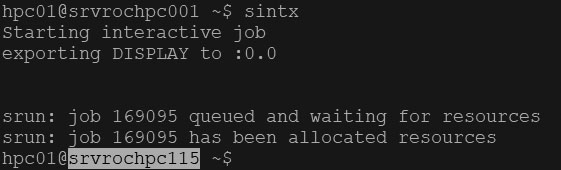
If you don’t see this then you’re still on the head node.
If you do run processes on the head node repeatedly your account will be disabled.
On Demand:
UCT HPC has a web based On Demand portal. This gives researchers a graphical interface to submit jobs such as R, python, VScode and Jupiter Notebooks. If you start a job in the web interface you can close your browser and then reconnect to the job later in another browser session.
You can access the command line directly via the web interface or you can create SBATCH job templates and submit them without having to connect via an SSH terminal.
The web interface also allows you to edit files directly on the cluster and transfer files between your desktop and the cluster.